1. Manage New Opportunity Projects
- To manage New Opportunity Projects, open the FOCUS™ platform using this link:
https://app.projectfocushq.com/accounts/login/. - Login using your ‘Username’ and ‘Password’ and click the ‘Log-in’ button.
- Once logged in you will reach the Company’s Homepage, within the ‘Tiles’ section, navigate to ‘All Projects Dashboard’ by clicking the ‘Pipeline’ tile or ‘Pipeline’ from the top navigation menu.

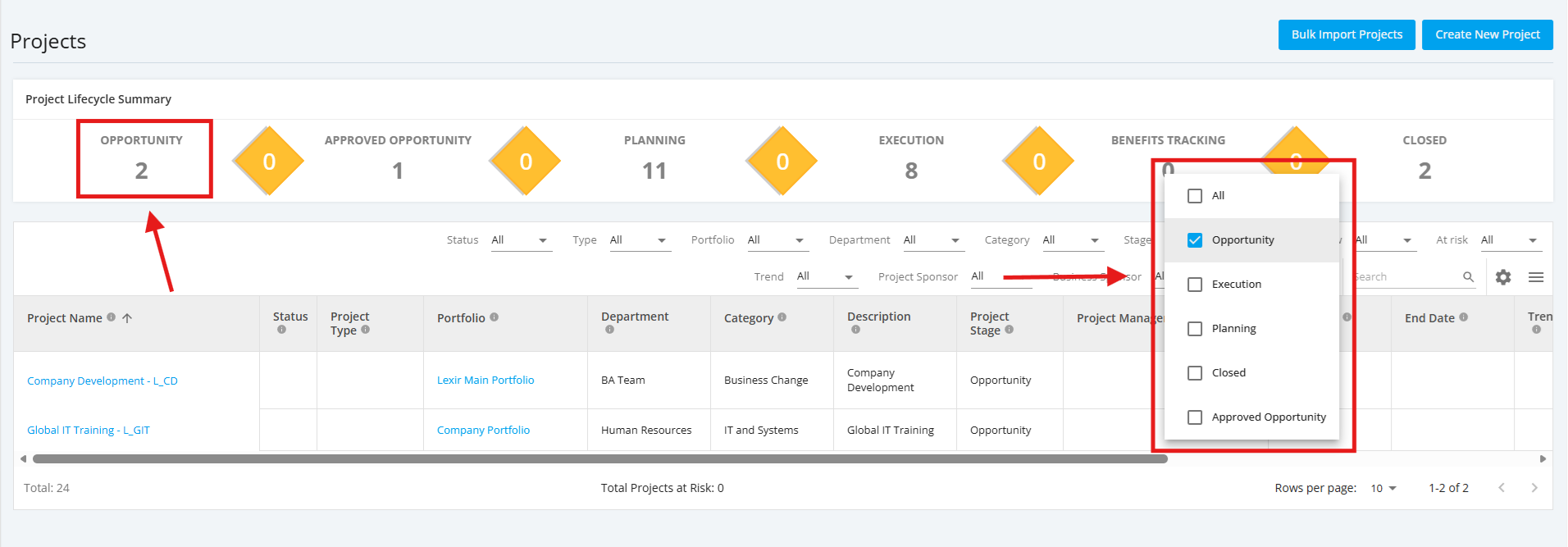
- Within the ‘All Projects Dashboard’ page, click ‘Opportunity’ in the Project Lifecycle Summary Table to see a display of New Opportunity projects.
You can also select 'Opportunity' from the 'Stage' Filter to see a display of New Opportunity projects.